
Add a recipe so dishes use your stock
List what a dish is made from. Each time the dish is paid for, Bizic takes those ingredients out of your stock, so your stock stays right without counting after every service.
On this page
Before you start
Your ingredients need to be in your stock first, with the unit you count them in (kg, litre, piece). Add them as products if they aren't.
Write the recipe
Open Menu and tap the dish. Recipes are for dishes and drinks Cooked to order; things Ready from stock already use their own stock.
Opening a dish and finding its recipe Under Recipe, tap Add an ingredient and choose it.
Enter the Amount one batch uses, in the unit shown, and the Waste (%) you lose to trimming or spills, if any.
Set how many portions it Makes. A pot of soup that serves ten makes 10 portions; one grilled fish makes 1.
Tap Save dish.
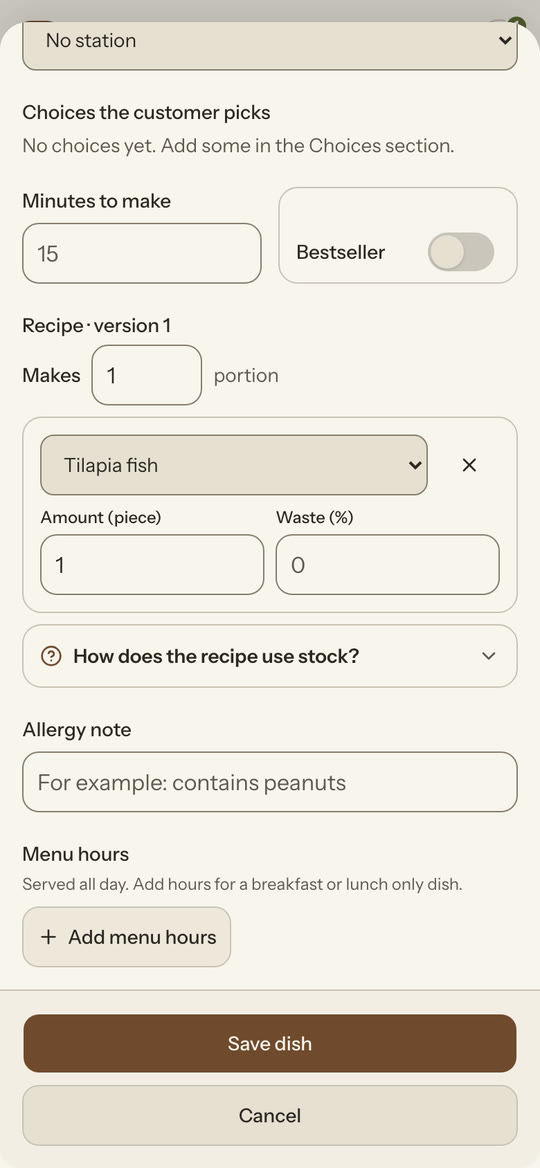
A recipe: one tilapia fish for each portion
From now on, every portion that is paid for, or put on a hotel guest's room, takes its share of each ingredient out of your stock.
Last change, 5 November 2026: First version.
Still stuck?
Tell us what you were trying to do. A real person reads every message.